

Best Affirmation Apps in 2026, Compared

By Luminora TeamPublished Updated Sources checked

From the team behind Luminora. How we write and check articles.

A stack of index cards tied with terracotta string and a vintage microphone on a wooden desk in a sunlit, arched reading room.
Original editorial illustration.

Published by the team behind Luminora, one of the apps compared here. We have a commercial interest in Luminora. This is a publisher comparison based on public listings and official pages read on November 18, 2026. It is not an independent review or a hands-on test, and it compares features, not health outcomes.

Six affirmation apps, side by side

Published by the Luminora team, which makes Luminora. We have a commercial interest in Luminora. This is a publisher comparison, not an independent review.

US App Store listings and each publisher’s official pages, for the iPhone and iPad apps. We did not buy subscriptions or run hands-on tests; the one in-app check is named in its cell. A confirmed feature may still need payment. Checked November 18, 2026.

“Not confirmed” means we have not established the answer. An omitted feature in a store description is not evidence that the feature is absent.

Swipe the table horizontally to compare the apps.

Six affirmation apps, side by side; checked 2026-11-18
Task or featureLuminoraI amMantraThinkUpInnertuneDaily Affirm
Main thing you do with the wordsConfirmed support

Read quotes, open the story behind them, and ask a question in SEEK.

Confirmed support

Read affirmations by category, with reminders. Practice guides you through repeating them.

Confirmed support

Read and swipe affirmations, with guided audio sessions as well.

Confirmed support

Choose or write affirmations, record them and play them back with music.

Confirmed support

Listen to playlists of spoken affirmations over background beats.

Confirmed support

See one affirmation on a widget without opening the app.

Record affirmations in your own voiceNot confirmed

Not described on our feature pages. Luminora is a reading app.

Not confirmed

Practice has a voiceover. Recording your own voice is not described.

Confirmed support

“Record your voice and listen on repeat.”

Confirmed support

The core of the app. The free version allows three recordings (listing) or four (FAQ).

Confirmed support

Listed under Premium.

Not confirmed

Not described in its listing or on its site.

Home Screen widgetConfirmed support

Home Screen quote widgets.

Confirmed support

Basic widgets are on the free plan; more customization is in Premium.

Confirmed support

Home Screen and Lock Screen widgets.

Not confirmed

Not described in its listing or FAQ.

Not confirmed

Not described in its listing or on its app page.

Confirmed support

The main feature: small, medium and large, plus Lock Screen and StandBy.

See who said a line, and whyConfirmed support

Context on literary quotes: who said it, what was happening and why, with a short biography. More than 2,200 quotes have it.

Confirmed not supported

Our team checked the app on November 14, 2026: the reading screen has share and favorite buttons, with no author or background to open.

Not confirmed

Not described in the sources we read.

Not confirmed

Not described in the sources we read.

Not confirmed

Not described in the sources we read.

Not confirmed

Not described in the sources we read.

Ask a question and get a line chosen for itConfirmed support

Ask in SEEK and get a quote that fits.

Not confirmed

Not described in the sources we read.

Not confirmed

Not described in the sources we read.

Not confirmed

Not described in the sources we read.

Not confirmed

AI-personalized playlists are listed under Premium. Asking a question for a line is not described.

Not confirmed

Not described in the sources we read.

More than one language listed on the App StoreConfirmed support

Six, with the translation shown under the original.

Confirmed support

14 languages. We did not check how much of the content is translated.

Confirmed support

10 languages. We did not check how much of the content is translated.

Confirmed not supported

Apple lists English only.

Confirmed not supported

Apple lists English only.

Confirmed support

Apple lists 17. The publisher says 19, each with its own library.

What you get without payingConfirmed support

Four collections a day, chosen at random, and a limited number of SEEK questions.

Confirmed support

Main feed, basic topics, rotating “Free today” topics, favorites, basic widgets and reminders. From a help page shared across the publisher’s apps.

Not confirmed

Free to download. We could not establish what stays free.

Confirmed support

A short program: three or four recordings and one music track.

Confirmed support

Unlimited listening time, night mode and daily reminders.

Confirmed support

Widget in every size, 3 categories (300 affirmations), 3 themes and one banner ad.

US prices listed on the App StoreConfirmed support

$4.99 a month or $49.99 a year.

Confirmed support

Named plans include $14.99 a month, $59.99 a year and $89.99 lifetime.

Confirmed support

$4.99 a month or a week, annual entries from $14.99 to $59.99, and $74.99 lifetime.

Confirmed support

$7.99 a month, $39.99 a year, and lifetime entries at $79.99 and $99.99.

Confirmed support

Monthly entries from $9.95 to $19.99, $29.99 a year, $4.99 a week, plus entries with no named period.

Confirmed support

One purchase at $4.99, $9.99 or $14.99. Each unlocks the same thing.

US App Store ratingConfirmed support

5.0 from 30 ratings.

Confirmed support

4.8 from about 740,000 ratings.

Confirmed support

4.8 from about 34,000 ratings.

Confirmed support

4.7 from about 7,500 ratings.

Confirmed support

4.8 from about 12,000 ratings.

Confirmed support

4.5 from 42 ratings.

The best affirmations app depends on what you want to do with the words. If “I am” statements don’t sound like you, start with Luminora, our app: literary quotes, real words from real people, with the story behind them. For a steady feed of ready-made positive affirmations, try I am. To hear affirmations in your own voice, try ThinkUp. To press play and listen, try Innertune. For a free affirmation app with no subscription, look at Daily Affirm.

Luminora publishes this article, and Luminora is our app, so read what we say about it with that in mind. We put it first, and the order is not a ranking. For every app here we read the US App Store listing and the publisher’s own pages on November 18, 2026. We did not subscribe to these apps or run hands-on tests for this comparison; the one in-app check, made by our team on November 14, is marked in the table. Ratings and prices change.

Which affirmation app should you pick?

  • Real words, with who said them and why: Luminora.
  • Ready-made lines through the day: I am.
  • Reading, recording and guided audio in one app: Mantra.
  • Your own voice, played back: ThinkUp.
  • Press play and listen: Innertune.
  • A free Home Screen widget, no subscription: Daily Affirm.
  • Affirmations alongside a journal: Gratitude.

If you want real words with the person and the story behind them, start with Luminora. If you have no strong preference and simply want the classic format, start with I am. It has by far the most ratings of any app here, and its free version lets you find out whether daily affirmations suit you before you pay for anything.
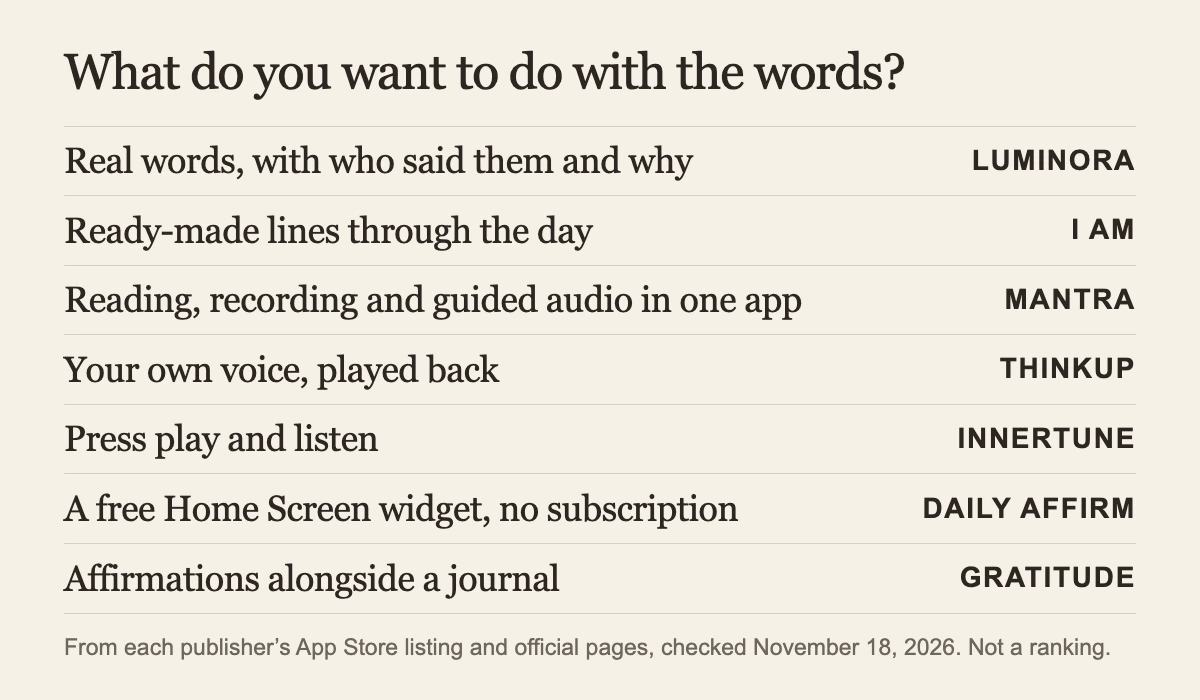
A list titled What do you want to do with the words? Real words, with who said them and why: Luminora. Ready-made lines through the day: I am. Reading, recording and guided audio in one app: Mantra. Your own voice, played back: ThinkUp. Press play and listen: Innertune. A free Home Screen widget, no subscription: Daily Affirm. Affirmations alongside a journal: Gratitude.
Our summary of each publisher’s listing and official pages, checked November 18, 2026. Not a ranking.

Luminora: best for real words with their story

This is our app, and it takes a different route from the others below. Luminora is built around quotes rather than statements written for you to repeat. On a literary quote in LEARN, tap Context to read who said it, what was happening and why, with a short biography of the author. More than 2,200 quotes come with their story, so a line arrives with the person and the moment behind it.

You can also ask a question in SEEK and get a quote that fits it, and read in six languages: English, Spanish, Japanese, Korean, Simplified Chinese and Traditional Chinese, with the translation under the original.

If you like the shape of an affirmation, Premium includes an Affirmations collection of 47 quotes, each with its Context. Four collections are free each day, chosen at random, and you can ask a limited number of questions in SEEK without paying. Premium is listed at $4.99 a month or $49.99 a year in the US. Our Context page explains how the notes are prepared and what is checked. Luminora FAQ; App Store.
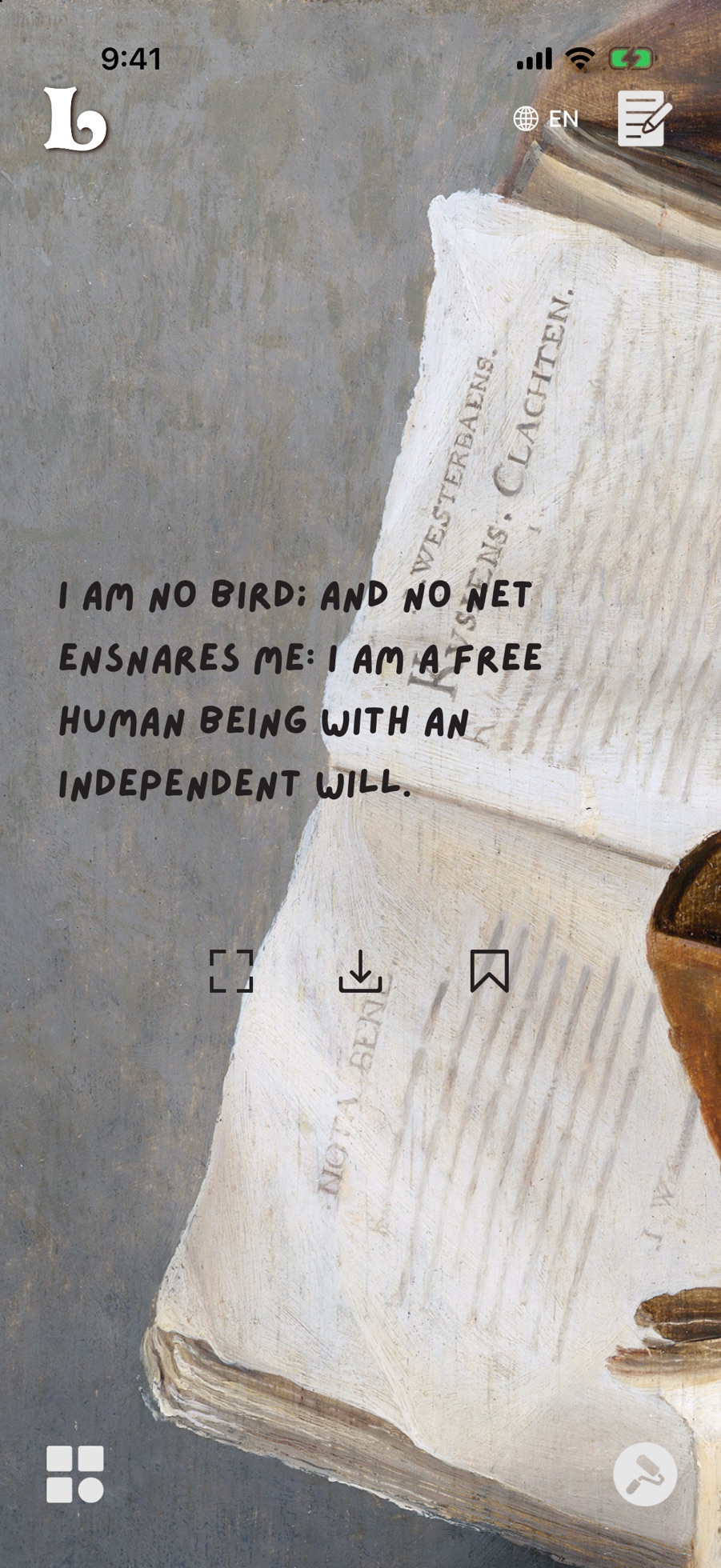
Luminora LEARN screen showing the line “I am no bird; and no net ensnares me: I am a free human being with an independent will.”
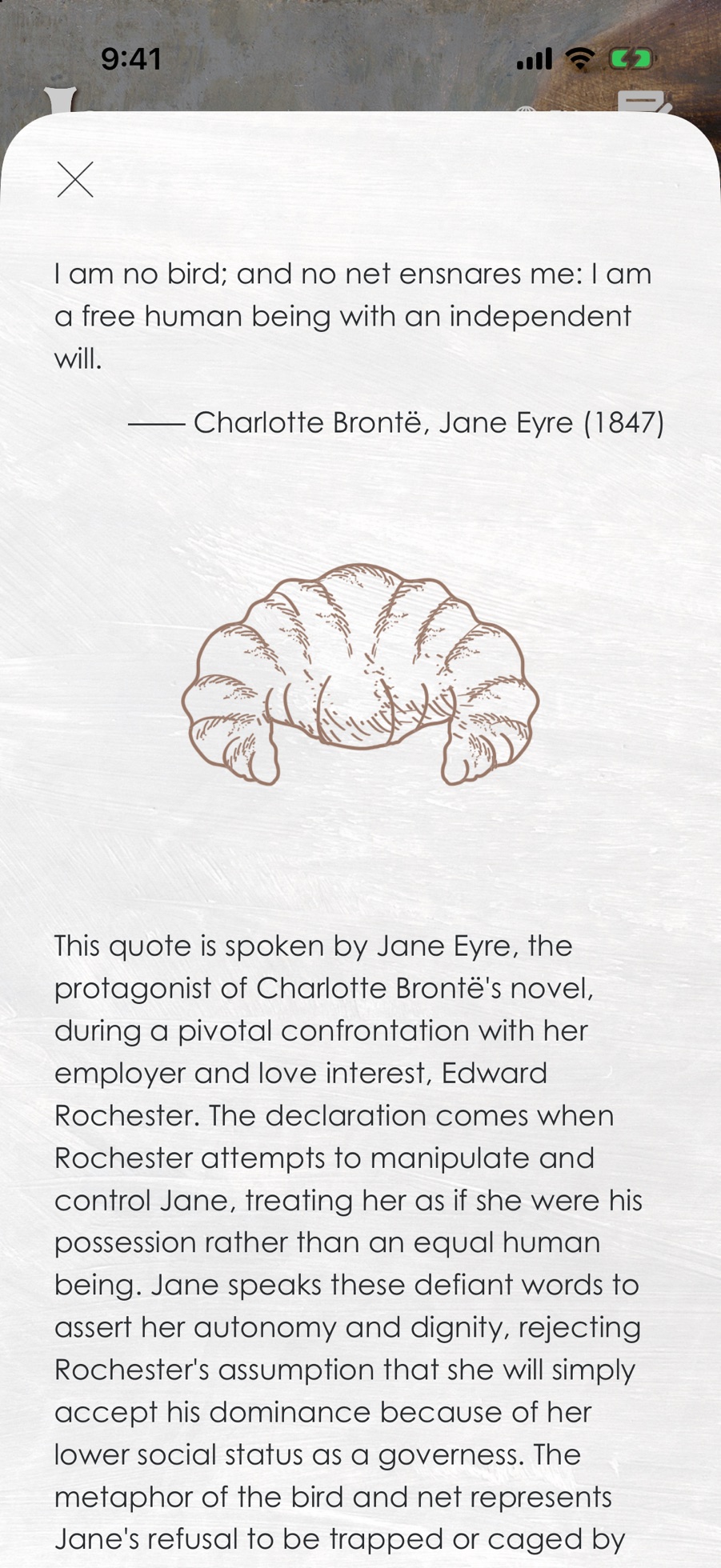
Luminora Context screen for the same line, credited to Charlotte Brontë, Jane Eyre (1847), with a note on Jane’s confrontation with Rochester.
A quote from the Affirmations collection in LEARN. Its Context: who said it, and why. Source: Luminora on iPhone.

I am: best for a daily feed of ready-made affirmations

I am, from Monkey Taps, has been on the App Store since 2014 and shows 4.8 stars from about 740,000 US ratings. You choose the areas of life you care about and it serves affirmations from those categories, with reminders, themes and widgets. Its Practice feature guides you through repeating affirmations, with a voiceover you can turn off, and you can add lines of your own. App Store; official site; Practice; your own content.

The free version includes the main feed, basic topics, rotating “Free today” topics, favorites, and basic widgets and reminders, according to the help center Monkey Taps shares across its apps. Apple’s listing notes that the app contains advertising. Named plans include $14.99 a month, $59.99 a year and $89.99 for lifetime access. Free vs. Premium. Already using it and ready for a change? See our guide to I am alternatives, or compare it directly in Luminora vs I am.

Mantra: best for variety in one app

Mantra’s listing covers a lot of ground: more than a thousand “I am” affirmations, 30+ categories, reminders, your own affirmations and collections, voice recording you can play on repeat, guided sessions and ambient sounds. Its website adds Home Screen and Lock Screen widgets and breathwork. It shows 4.8 stars from about 34,000 US ratings. App Store; official site.

The US listing shows $4.99 a month, $4.99 a week, annual entries from $14.99 to $59.99 and $74.99 for lifetime access, so the offer you see may differ. Apple’s listing notes that the app contains advertising. We could not establish from public pages what stays free, so check the paywall before you build a routine around one feature.

ThinkUp: best for hearing your own voice

ThinkUp is built around one activity. You pick from 300+ affirmations or write your own, record them, add music and play the set back. Several apps here offer recording, but in ThinkUp it is the routine itself. It shows 4.7 stars from about 7,500 US ratings. App Store.

The free version lets you build a short program with one default music track. The App Store says you can record three affirmations and the FAQ says four, so expect a small allowance either way. Premium is listed at $7.99 a month or $39.99 a year, with lifetime entries at $79.99 and $99.99. Apple lists it for iPhone and Apple Watch, in English, and the current version dates from August 2025. For more on the choice between recording and reading, see Luminora vs ThinkUp.

Innertune: best for listening

Innertune is made for pressing play. It plays spoken affirmations over background beats, and you can leave them looping. The listing says the free version includes unlimited listening time, night mode and daily reminders. It shows 4.8 stars from about 12,000 US ratings. App Store; app page.

Premium is where most of the range sits: the listing puts 77,000 affirmations, 550+ playlists, 19 voices, recording in your own voice, AI-personalized playlists and offline downloads under it. US entries include monthly plans from $9.95 to $19.99, $29.99 a year and $4.99 a week, along with others that name no period, so check the price you are shown. On the App Store it is an iPhone app.

Daily Affirm: best free option with no subscription

Daily Affirm puts one affirmation on your Home Screen and changes it on a schedule you set, so you don’t have to open the app. The App Store name is Daily Affirmations: Widget, by Roman Samoilenko of TidyBit; other apps have similar names, so check the developer. The free version gives you the widget in every size, three categories of your choice (300 affirmations), three themes, favorites and sharing, with one small banner ad. App Store.

One purchase removes the ad, opens all 17 categories and 1,700 affirmations, and lets you write your own. It is offered at $4.99, $9.99 or $14.99, and each price unlocks the same thing. There is no account, and the publisher says it works offline, with a separate library in each of 19 languages. It is also the newest app here, released in May 2026, with 4.5 stars from 42 US ratings. Official site.

An olive alarm clock, a terracotta cup and a handwritten note on a wooden table beside an open window overlooking misty woods.
Original editorial illustration.

Also worth a look: Gratitude

Gratitude is a journal first, so we left it out of the table, but it suits anyone who wants affirmations inside a wider habit. It offers hundreds of affirmations to read or listen to, and you can write your own, add music and record your voice. The free plan includes free affirmations plus your own, and its site lists Gratitude Pro at $39.99 a year or $6.99 a month, while the App Store shows other entries too. It shows 4.9 stars from about 45,000 US ratings. App Store; official site.

How to choose an affirmation app

  1. Name the activity. Reading a line, hearing it, recording it and glancing at a widget are different habits. Pick the one you can see yourself doing next week.
  2. Test the wording. Read a few lines aloud. If they feel untrue, look for an app that lets you write your own, or try a different kind of text.
  3. Check the free version for the feature you want. “Free” on the App Store describes the download. Recording, offline listening or extra categories may sit behind a paywall.
  4. Compare the billing term. Listings can show several prices for the same plan, so go by the purchase screen, and note whether the plan renews.

Common questions

What is the best free affirmation app?

If you want to avoid a subscription altogether, Daily Affirm: the free version works on its own and the upgrade is a single purchase. For free listening, Innertune lists unlimited listening time. For a free daily feed, try I am. All of them keep some features for paying users.

Is there an affirmation app without a subscription?

Yes. Daily Affirm’s upgrade is a one-time purchase. I am, Mantra and ThinkUp also list lifetime options on the US App Store, at higher prices.

Which affirmation apps let you record your own voice?

ThinkUp, Mantra and Gratitude describe it, and Innertune lists it under Premium. We could not confirm it for I am or Daily Affirm. Luminora is for reading rather than recording.

Are these apps on Android?

This comparison covers iPhone and iPad. The official sites for I am, ThinkUp, Innertune, Daily Affirm and Gratitude link to Google Play, but we did not review those versions. Luminora is for iPhone and iPad.

Do affirmation apps work?

This article compares features, not results, so it can’t answer that. Research on self-affirmation shows modest average benefits in specific settings, which does not validate any particular app, ours included. We go through the evidence in Do Affirmations Work?

Can a quote do the job of an affirmation?

It does something related. An affirmation puts you in the sentence, while a quote brings in someone else’s voice. Some people prefer one, and some keep both. Our guide to affirmations and quotes sets out the difference, and our comparison page looks at quote and affirmation apps together.

Questions readers also ask

  • Luminora or ThinkUp: read or record?

    Choose between Luminora’s quote-led reflections and ThinkUp’s own-voice affirmations, with US prices, free-access caveats, and a practical comparison.

  • Luminora or I am: which fits you?

    Compare Luminora’s quotation-led reflection with I am’s affirmation practice, including verified features, US prices, and free-access uncertainties.

  • Do affirmations work?

    Self-affirmation research shows modest average benefits in specific settings. Values reflection, positive statements, and quote reading need separate answers.

  • Which “I am” quotes come from real people?

    Twenty-four affirmation quotes from real writers, including “I am” lines from Whitman, Brontë, Hurston and Henley. Each is checked against its source, with who said it and what was happening at the time.

  • Which kind of calm app fits your bedtime?

    Compare narrated audio, optional reading, sound mixes, and tracking. Check current access terms and keep insomnia treatment separate from a bedtime routine.

Sources (22)

  1. I am - Daily Affirmations: US App Store listing · Apple App Store / Monkey Taps · ID 874656917, version 7.9.0, updated November 12, 2026. Used for rating, release year, named prices, languages, the advertising label and the privacy label. Wellbeing claims in the listing are not treated as evidence.
  2. I am: official site · Monkey Taps · Categories, themes, reminders, widgets and the Google Play link.
  3. What features are free vs. Premium? · Monkey Taps FAQ · Help center shared by all Monkey Taps apps, so some items apply to other apps. Edited May 14, 2026.
  4. How does the affirmation Practice work? · Monkey Taps FAQ · Describes Practice in I am and its optional voiceover. It does not say whether Practice is free.
  5. How do I create my own content? · Monkey Taps FAQ · Shared help center. Whether this is limited on the free plan is not stated.
  6. Mantra - Daily Affirmations: US App Store listing · Apple App Store / Broftware House · ID 1202851636, version 5.9.7, updated October 19, 2026. Used for features, rating, prices, languages, the advertising label and the privacy label. Wellbeing claims in the listing are not treated as evidence.
  7. Mantra: official site · Broftware House · Widgets, voice recording, guided sessions and breathwork. The site gives no free or Premium breakdown.
  8. ThinkUp - Daily Affirmations: US App Store listing · Apple App Store / Precise Wellness · ID 906660772, version 1.18.11, dated August 3, 2025. The listing says three free recordings. Wellbeing claims in the listing are not treated as evidence.
  9. ThinkUp FAQ: free and Premium versions · ThinkUp · The FAQ says four free recordings, which differs from the App Store listing. We have not resolved the difference.
  10. ThinkUp: official site · ThinkUp · Used only for the Android download link.
  11. Innertune: Daily Affirmations: US App Store listing · Apple App Store / Innertune Media · ID 6443625379, version 6.14.3, updated November 5, 2026. Used for the free and Premium lists, prices, rating, language and privacy label. Its claims about anxiety and sleep are not treated as evidence.
  12. Innertune Affirmations app page · Innertune Media · Describes voiced affirmations and own-voice recording. It says “No ads” and “Works offline”, while the App Store lists offline downloads and zero ads under Premium; we follow the listing.
  13. Daily Affirmations: Widget: US App Store listing · Apple App Store / Roman Samoilenko (TidyBit) · ID 6770310532, version 1.5.3, updated November 10, 2026, first released May 27, 2026. Sold under the name Daily Affirm. Used for free and paid features, prices, rating, languages and privacy label.
  14. Daily Affirm: official site · TidyBit · One-time purchase, no account, offline use and 19 language libraries. The site shows 4.8 from 182 ratings without saying which stores or countries that covers; we quote the US App Store figure.
  15. Gratitude: Self-Care Journal: US App Store listing · Apple App Store / Hapjoy Technologies · ID 1372575227, version 6.0.3, updated November 7, 2026. Used for rating and affirmation features.
  16. Gratitude: official site and plans · Hapjoy Technologies · Free and Pro plans with US prices as the publisher states them. The App Store shows other entries too.
  17. Luminora: Daily Calm Quotes: US App Store listing · Apple App Store / Luminora · Our app. ID 6752835470, version 2.0.2, updated November 13, 2026. Used for rating, prices, languages and privacy label. Wellbeing wording in the listing is not treated as evidence.
  18. Context: the story behind the quote · Luminora · Our own page. Context appears on literary quotes; LEARN reflections with no author do not have it. The count of more than 2,200 quotes is our own figure.
  19. SEEK: ask a question, get a quote that fits · Luminora · Our own page, including the note that free use has a question limit.
  20. Read quotes in six languages · Luminora · Our own page.
  21. Luminora FAQ · Luminora · Our own page: free collections, Premium, widgets and devices.
  22. Compare quote and affirmation apps · Luminora · Our own page. It records the in-app check of I am made by the Luminora team on November 14, 2026.

Topics in this article: App Comparisons & Alternatives · Affirmations