
Apps That Answer Your Question With a Quote, Compared

By Luminora TeamPublished Updated Sources checked

From the team behind Luminora. How we write and check articles.

A folded paper note and a closed book with a ribbon marker, drawn in pen and ink on ivory paper.
Original editorial illustration.

Published by the team behind Luminora, one of the apps compared here. We have a commercial interest in Luminora. This is a publisher comparison based on public App Store listings read on November 20, 2026. It is not an independent review or a hands-on test.

What each app gives you back

Published by the Luminora team, which makes Luminora. We have a commercial interest in Luminora. This is a publisher comparison, not an independent review.

iPhone and iPad, United States. Based on each publisher’s App Store listing and, for Luminora, its own SEEK page. No app other than Luminora was installed or tested. Checked November 20, 2026.

“Not confirmed” means we have not established the answer. An omitted feature in a store description is not evidence that the feature is absent.

Swipe the table horizontally to compare the apps.

What each app gives you back; checked 2026-11-20
Task or featureLuminoraWell SaidAsk MarcusGreatly AISagiusQuote Oracle
Starts from your own question or situationConfirmed support

Type a question or pick a suggested one in SEEK.

Confirmed support

Describe the moment in Find.

Confirmed support

Type what you are struggling with.

Confirmed support

Type or speak what you are going through.

Confirmed support

Ask a philosopher in a chat.

Confirmed support

Answer three short questions.

Explains the quoteConfirmed support

A short reading, plus a note on where the line comes from.

Confirmed support

Ask what a quote means and where it came from.

Confirmed support

Meaning in plain English and how it applies.

Not confirmed

The listing describes advice drawing on quotes, not an explanation of each quote.

Confirmed support

Tap a quote to ask what it means.

Confirmed support

A commentary on background and meaning.

Names the source of the quoteConfirmed support

Author and source on the card. Chosen when you ask and not individually reviewed.

Not confirmed

The listing says it searches its own collection and the web; it does not say how sources are shown.

Confirmed support

Book, chapter and section references, per the listing.

Not confirmed

Not stated in the listing.

Not confirmed

Chat replies are written by AI in a philosopher’s voice; the listing does not say how library quotes are sourced.

Not confirmed

Not stated in the listing.

What you get without payingConfirmed support

A limited number of questions.

Confirmed support

For You, Find, Ask, Write and Save can be tried for free.

Confirmed support

Three consultations a month and a daily quote.

Not confirmed

The listing puts its main features under a subscription and does not state a free allowance.

Confirmed support

5 AI credits, and 5 more with a free account.

Confirmed support

One card a day.

Yes, there are apps where you ask a question and get a quote that fits your situation. We found six on the US App Store. They differ in two ways that matter: where the quote comes from, and what you get with it. If you want the quote to come with a short reading and the story behind the line, start with SEEK in Luminora, our app. If you want to search a large collection in your own words, look at Well Said. If you want Stoic sources with chapter references, look at Ask Marcus.

Luminora publishes this article, and Luminora is our app, so read what we say about it with that in mind. We put it first, and the order is not a ranking. For every other app we read the US App Store listing on November 20, 2026 and report what it says. We did not install or test them.

Which one should you pick?

  • A quote with a reading and the story behind it: Luminora (SEEK).
  • Search any collection by describing the moment: Well Said.
  • Stoic quotes with book and chapter references: Ask Marcus.
  • Advice written around famous quotes, supportive or blunt: Greatly AI.
  • A conversation in a philosopher’s voice: Sagius.
  • One card a day after three short questions: Quote Oracle.
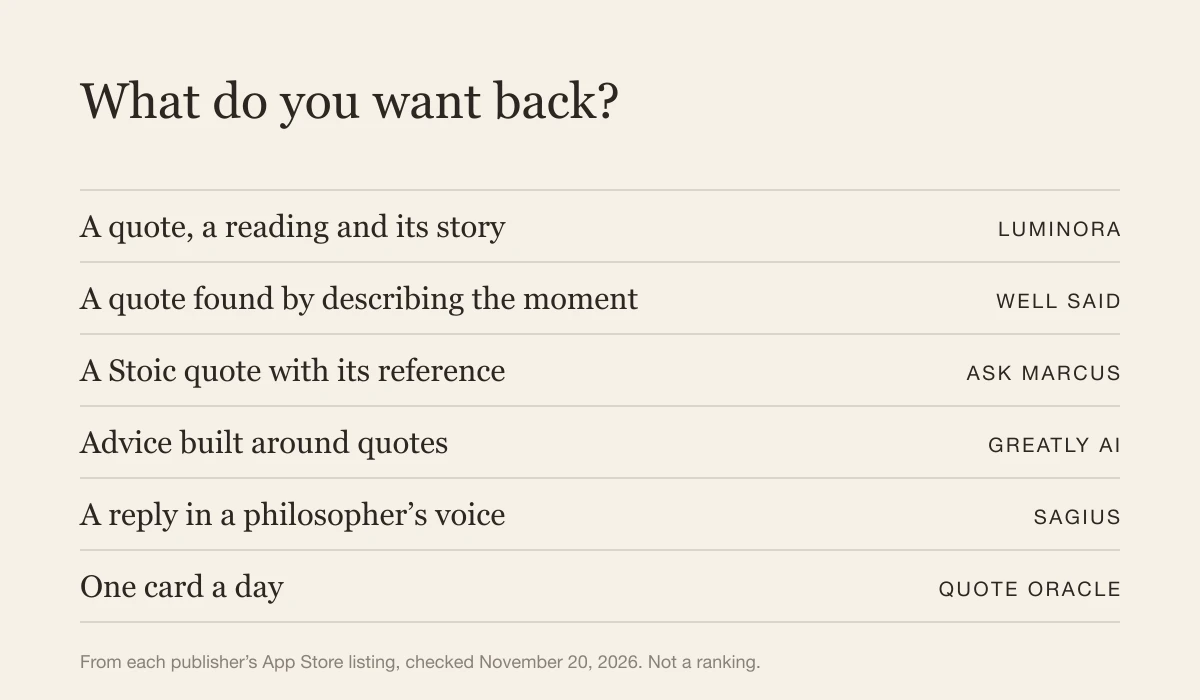
A list titled What do you want back? A quote, a reading and its story: Luminora. A quote found by describing the moment: Well Said. A Stoic quote with its reference: Ask Marcus. Advice built around quotes: Greatly AI. A reply in a philosopher’s voice: Sagius. One card a day: Quote Oracle.
Our summary of each publisher’s App Store listing, checked November 20, 2026. Not a ranking.

Luminora: a quote, a reading and its story

This is our app. In SEEK you type what is on your mind, or pick a suggested question. Luminora draws one of the 64 I Ching hexagrams at random as a starting point and returns an Illumination: a one-line answer, a small step, and a short reading. Flip the card and there is a quote that fits, with its author, its source and a note on where the line comes from. Every SEEK card includes Luminora’s Context on that side, with a short biography of the author.

Two things to know before you rely on it. The hexagram is random, so the same question can bring a different card. And the reading, the choice of quote and the note are produced when you ask, with AI assistance, and are not individually reviewed by a person. Quotes in LEARN, the app’s daily collections, are checked before they are published; SEEK’s are not. The SEEK page shows one real card, and the line on it checked against the published poem.

You can ask a limited number of questions without paying, and Premium includes unlimited questions. The US listing shows $4.99 monthly and $49.99 yearly. Luminora is for iPhone and iPad and reads in six languages.

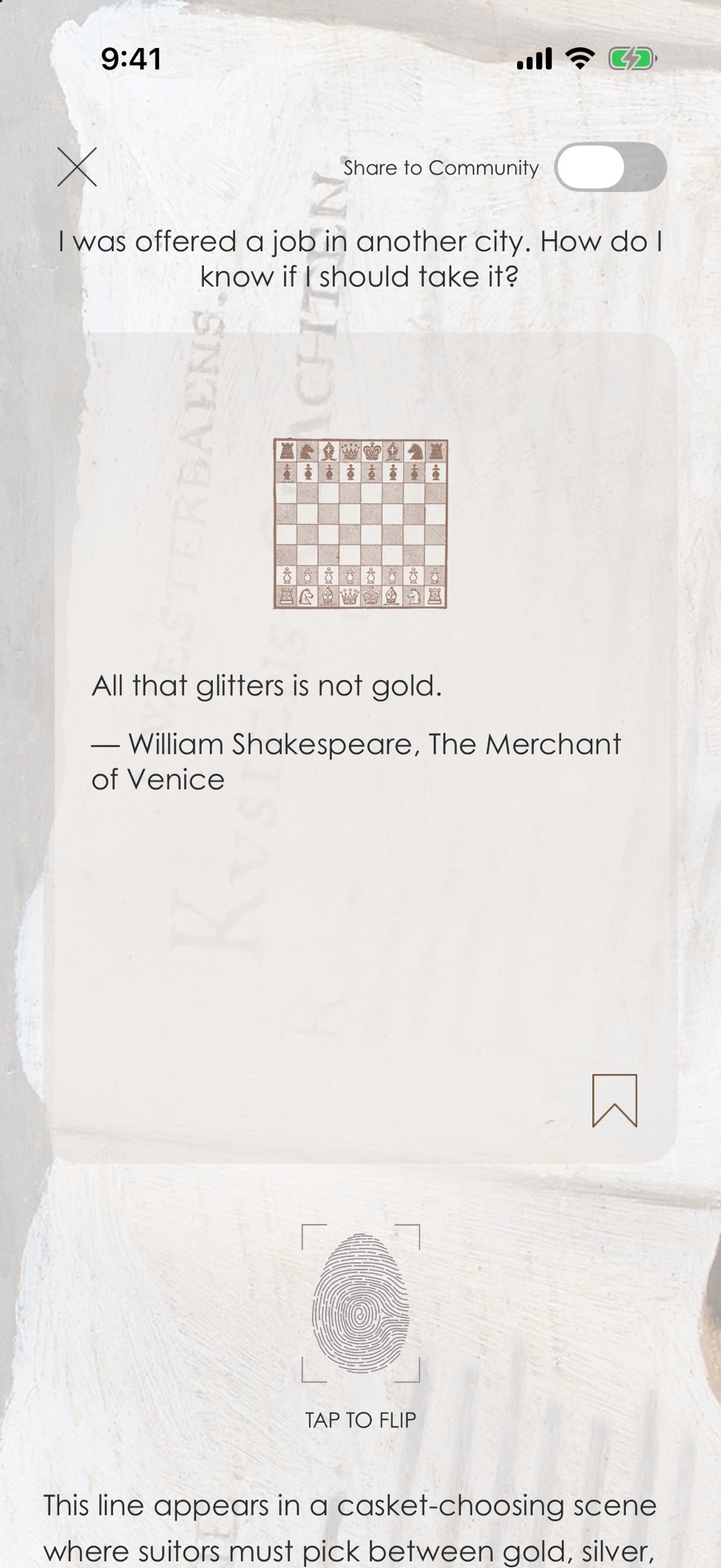
For this article we asked SEEK one question: “I was offered a job in another city. How do I know if I should take it?” The card drew hexagram 22 and answered, “Adorn the decision with substance, not just surface appeal.” On the other side was “All that glitters is not gold,” credited to William Shakespeare, The Merchant of Venice. We checked it. The line is in Act 2, scene 7, where the Prince of Morocco opens the gold casket and reads it from a scroll, and the MIT edition of the play prints it as the card shows. Some editions keep the older spelling, “glisters”.
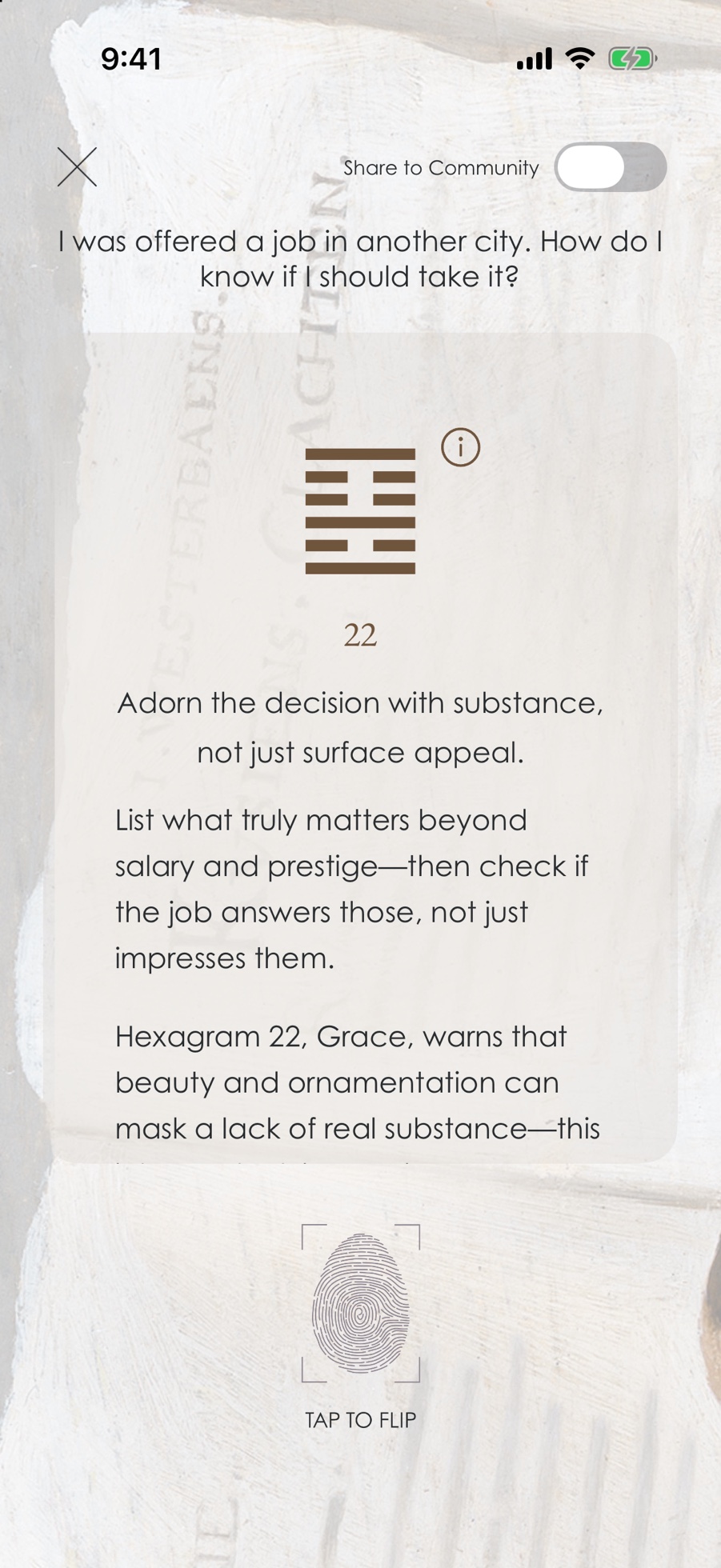
A SEEK card in Luminora showing the question about a job in another city, hexagram 22, the line “Adorn the decision with substance, not just surface appeal.” and the start of the reading.
The other side of the same card: “All that glitters is not gold.” credited to William Shakespeare, The Merchant of Venice, with the start of a note on the casket scene.
The Illumination for our question: a hexagram, a one-line answer and a short reading. The other side: the quote, its source and where the line comes from. Source: Luminora on iPhone.

Well Said: search by describing the moment

Well Said’s listing describes a Find feature where you write what you need in your own words, such as “I feel stuck and don’t know what’s next”, and it searches its own collection and the web. An Ask feature lets you ask what a quote means and where it came from. It also keeps Bible verses and your own writing in the same library, with widgets and sync between iPhone and iPad.

The listing says you can try For You, Find, Ask, Write and Save for free, and that a monthly or annual membership opens every feature. It requires iOS 26 or later.

Ask Marcus: Stoic sources, with references

Ask Marcus is limited to Stoic writers on purpose. You type a struggle and, according to the listing, get back a quote, its meaning in plain English, how it applies to your situation and a practice for the day. The listing says its 1,178 quotes carry book, chapter and section references from Marcus Aurelius, Epictetus, Seneca, Zeno and Cato the Younger.

Free use covers three consultations a month and a daily quote. Pro adds unlimited consultations, the full journal and a Home Screen widget.

Pen-and-ink drawing of a blank folded note standing beside an open book with an olive ribbon bookmark.
Original editorial illustration.

Greatly AI: advice built around quotes

Greatly AI describes itself as an AI companion. You type or speak what you are going through and it replies with guidance drawing on famous quotes, in a Supportive or a Tough Love tone. The listing places its main features, including the tone control and short biographies, under a monthly or annual subscription. Read this one as advice with quotes in it, more than a quote finder.

Sagius: talk to a philosopher

Sagius offers chats with 21 named philosophers, written by AI “in each philosopher’s actual voice”, in the listing’s words, along with a daily quote from a library it puts at more than 7,200 quotes. You can tap a quote and ask what it means. You start with 5 free AI credits and get 5 more with a free account; after that the listing describes a subscription.

A reply in a philosopher’s voice is new writing in their manner. It is not a quotation, so treat any line from a chat as a paraphrase unless the app shows its source.

Quote Oracle: one card a day

Quote Oracle asks three short questions and gives you one quote card, with a commentary on the quote’s background and meaning. The listing says one card a day is free, there are no ads and no account, and records stay on your device. Premium opens your full card history and trend readings.

What about asking ChatGPT?

A general chat assistant will give you a quote for almost any situation, and it is free to try. The risk is accuracy: assistants sometimes credit a line to the wrong person or produce a line nobody wrote. If you use one, ask it for the work and the year, then look the line up.

The same caution applies to every app here that writes its reply at the moment you ask, ours included. An app has an advantage only where it shows you the source of the line, or where a person has checked the quotes beforehand. Ask Marcus says its quotes carry references. In Luminora, the LEARN collections are checked by a person and SEEK is not.

How to choose

  1. Decide what you want back. A quote alone, a quote with an explanation, or advice. These are different things, and most apps do one of them well.
  2. Check where the quote comes from. A fixed, checked collection is narrower and more reliable. A reply written on the spot fits your question more closely and needs checking.
  3. Look at the free allowance. Each app here limits free questions in a different way: per day, per month, or by credits.
  4. Try one real question in each. Use something that is on your mind this week, and see which reply you would want to read again.

Common questions

Is there an app where I ask a question and it gives me a quote?

Yes. Luminora (SEEK), Well Said, Ask Marcus, Greatly AI, Sagius and Quote Oracle all start from what you type or answer, not from a fixed daily quote.

Which of these use real quotes from real people?

Ask Marcus says every quote has a book, chapter and section reference. Well Said says it searches its own collection and the web. Luminora’s SEEK shows an author and a source for each quote, chosen at the moment you ask and not individually reviewed. Sagius chats are written by AI in a philosopher’s voice, which is not quotation.

Is there an app like the Book of Answers, but with real quotes?

Luminora’s SEEK is the closest of the six in spirit: a random draw sets the starting point, and the card carries a quote with its author and source. Quote Oracle also deals a single card after three questions.

Are these apps free?

All six are free to download and limit what you can do without paying. Check the current offer in each app before you subscribe; prices and limits change.

Are they on Android?

This comparison covers iPhone and iPad. We did not check Android versions.

Questions readers also ask

  • What are the best affirmation apps?

    The best affirmations app depends on what you want to do with the words. Luminora, which we make, is for reading real people’s words with the story behind them. I am suits a daily feed, ThinkUp your own recorded voice, Innertune listening, and Daily Affirm a free widget with no subscription.

  • What types of calm apps are there?

    Understand the differences between quote reading, guided meditation, sleep audio, breathing prompts, and journals before choosing a specific app.

  • Luminora or Motivation: which fits your routine?

    Compare how Luminora and Motivation help you find, display, save, and revisit quotes, with official feature details and US pricing limits.

  • How do you add a quote widget to your iPhone?

    Add Luminora to your Home Screen, choose a widget style, and understand the difference between a saved quote and a rotating collection.

  • How does Luminora work on iPhone Duo?

    Held open, iPhone Duo shows a quote on the left page and the story behind it on the right. Closed, Luminora looks as it does on any iPhone. Here is how each screen works.

Sources (8)

  1. SEEK: ask a question, get a quote that fits · Luminora · How SEEK works, the random hexagram, what is and is not reviewed, and the free allowance.
  2. Luminora: Daily Calm Quotes: US App Store listing · Apple App Store / Aprobee Technology · ID 6752835470, version 2.0.2. Used for the named prices and device support only.
  3. The Merchant of Venice, Act 2, scene 7 · The Complete Works of William Shakespeare, MIT · Used to check the wording and the scene of the line shown on the SEEK card.
  4. Well Said: Daily Quotes Widget: US App Store listing · Apple App Store / Grady Gaugler · ID 6772630797, version 2.0. Find, Ask, library contents, free and paid access, minimum OS.
  5. Ask Marcus: US App Store listing · Apple App Store / Rebecca Maxine Claybor Stallworth · ID 6762577570, version 1.0. Consultations, the 1,178 referenced quotes, free and Pro limits.
  6. Greatly AI: US App Store listing · Apple App Store / Greatly LLC · ID 6738329073, version 1.5.0. Typed or spoken input, response tones, features listed under subscription.
  7. Sagius: Ask a Philosopher: US App Store listing · Apple App Store / Gabriel Marchesan Almeida · ID 6760261050, version 2.5.0. Philosopher chats, quote library size, quote explanations, free credits.
  8. Quote Oracle: Daily Wisdom: US App Store listing · Apple App Store / Kazuhiro Kurosawa · ID 6779508306, version 1.4.0. Three questions, one card, commentary, free and Premium access, privacy statements.

Topics in this article: App Comparisons & Alternatives