
Quick Overview
Sleep apps are often recommended as a cure-all, but they work in very different ways. Some rely on narration and sound, others on tracking, interaction, or silence.
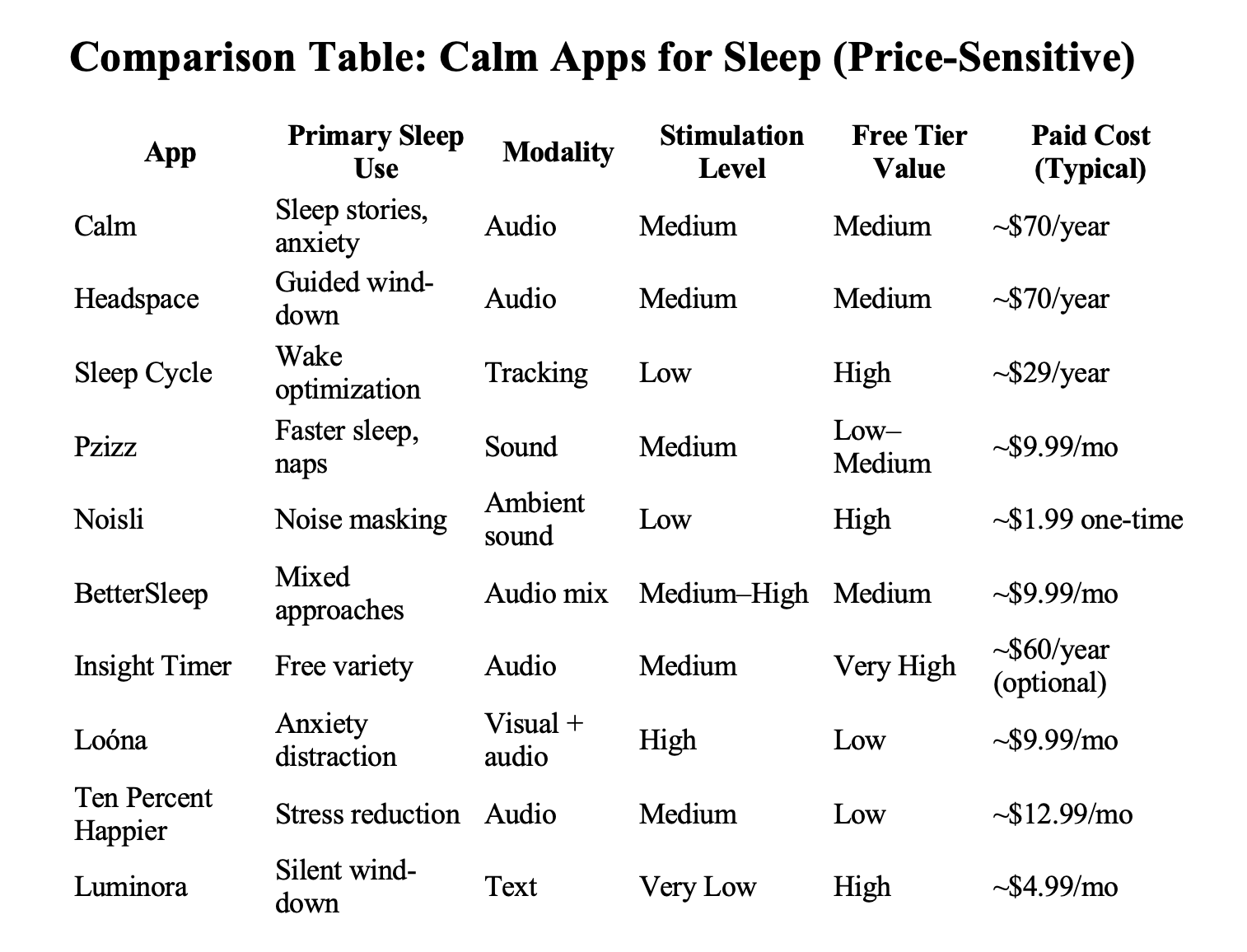
This guide compares the most commonly used calm and sleep apps in 2026 by sleep problem, stimulation tolerance, and usage style — including which apps help with racing thoughts, nighttime anxiety, noise sensitivity, or difficulty winding down.
Rather than ranking apps by popularity alone, this article explains which type of sleep app fits which situation, and where quiet, text-based tools like Luminora fit alongside audio and tracking apps.
How Sleep Apps Work (At a High Level)
Most sleep apps support sleep through one or more of the following mechanisms:
- Cognitive distraction – redirecting attention away from rumination
- Physiological calming – slowing breathing or nervous system activity
- Environmental masking – reducing disruptive noise or silence
- Habit scaffolding – creating consistent pre-sleep routines
- Sleep awareness – tracking patterns and wake timing
Different users respond to different mechanisms. There is no single “best” sleep app — only better matches.
App Categories Covered in This Guide
- Guided sleep & bedtime story apps
- Sleep tracking & smart alarm apps
- Psychoacoustic and sound therapy apps
- Ambient noise & sound mixer apps
- Community-driven meditation libraries
- Interactive visual wind-down apps
- Text-based, low-stimulation wind-down tools
If You’re Choosing a Sleep App Quickly
- Racing thoughts, need a voice: Calm, Headspace
- Silence feels uncomfortable: Noisli, Pzizz
- Want better wake-ups: Sleep Cycle
- Free variety, flexible use: Insight Timer
- Overstimulated, prefer silence: Luminora
Guided Sleep & Bedtime Story Apps
Calm
Best for: Nighttime anxiety, racing thoughts, users who need narration
Modality: Audio (Sleep Stories, music, bedtime meditations)
Pricing: Freemium; subscription required for full library
Calm is one of the most widely used sleep apps due to its large library of narrated Sleep Stories and calming audio. The content works primarily through cognitive distraction, gently redirecting attention away from rumination toward narrative or sound.
Limitations
- Fully audio-dependent
- Long sessions may not suit users who want quick wind-downs
- Subscription required for meaningful access
Headspace
Best for: Beginners who prefer structured guidance
Modality: Audio (Sleepcasts, breathing, guided meditation)
Pricing: Subscription-based
Headspace’s Sleepcasts combine light narration with ambient sound, designed to fade gradually into passive listening. The tone is instructional at first, which some users find reassuring.
Limitations
- Smaller sleep library than Calm
- Audio required; limited silent options
Sleep Tracking & Smart Alarm Apps
Sleep Cycle
Best for: Improving wake-up quality and sleep awareness
Modality: Sensor-based sleep tracking + smart alarm
Pricing: Free basic; premium subscription for analytics
Sleep Cycle focuses on measurement, not relaxation. It tracks sleep patterns and wakes users during lighter sleep phases to reduce morning grogginess. Many users pair it with a separate relaxation app.
Limitations
- Does not actively calm anxiety
- Consumer-grade tracking accuracy varies
Psychoacoustic & Sound Therapy Apps
Pzizz
Best for: Falling asleep faster; naps
Modality: Algorithmic soundscapes (music + voice + effects)
Pricing: Subscription or lifetime license
Pzizz generates dynamic audio sequences that change nightly, helping prevent habituation. It is especially popular for short sleep windows and naps.
Limitations
- Synthetic sound may not suit sensitive users
- Less effective for those who dislike voices
Ambient Noise & Sound Mixer Apps
Noisli
Best for: Noise masking; users who dislike narration
Modality: Customizable ambient sound mixer
Pricing: One-time low-cost purchase
Noisli allows users to build personalized sound environments (rain, wind, fire, etc.). It is frequently used for both focus and sleep, particularly by users who prefer non-verbal audio.
Limitations
- No guidance or sleep instruction
- Purely environmental
BetterSleep
Best for: Users who want multiple sleep approaches
Modality: Sound mixing, stories, guided exercises
Pricing: Freemium; subscription for full access
BetterSleep combines sound therapy, meditation, and stories in one interface, allowing experimentation across modalities.
Limitations
- Interface can feel busy
- Subscription required for full feature set
Community & Meditation Libraries
Insight Timer
Best for: Free, diverse sleep content
Modality: Audio (community-created meditations, music)
Pricing: Largely free; optional premium
Insight Timer offers a massive library of sleep-related content, including Yoga Nidra and sleep music. Quality varies, but the free tier is unusually generous.
Limitations
- Less structured experience
- Content quality depends on contributor
Interactive & Visual Wind-Down Apps
Loóna
Best for: Bedtime anxiety and racing thoughts
Modality: Interactive visual stories + audio
Pricing: Subscription-based
Loóna uses gentle interaction (coloring, assembling scenes) paired with narration to occupy attention just enough to prevent rumination.
Limitations
- Screen interaction may overstimulate some users
- Less suitable for light-sensitive sleepers
Pragmatic Meditation for Sleep
Ten Percent Happier
Best for: Stress-driven sleep issues; meditation skeptics
Modality: Guided audio meditation
Pricing: Subscription-based
This app focuses on practical mindfulness rather than sleep specifically. For some users, reducing daytime stress improves sleep indirectly.
Limitations
- Not sleep-first
- Smaller sleep-specific library
Text-Based, Low-Stimulation Wind-Down Tools
Luminora
Best for: Pre-sleep cognitive wind-down; overstimulated users
Modality: Text-only (quotes, reflective prompts)
Pricing: Paid app with free trial
Luminora is not a sleep app and does not provide audio, soundscapes, or tracking. Some users use it as a quiet pre-sleep ritual, similar to reading or journaling, particularly when audio or visual stimulation worsens alertness.
Common use patterns include:
- Reading 2–3 calming quotes instead of doomscrolling
- Using a short reflective prompt in Seek before bed
- Pairing Luminora with a sound or tracking app
Because it is text-only and designed for 1–2 minute sessions, Luminora tends to suit users who prefer minimal stimulation before sleep.
Not recommended if:
- Silence increases anxiety
- You rely on bedtime stories or sound masking
- You want sleep analytics or alarms
Frequently Asked Questions
Do sleep apps actually help with insomnia?
Many apps use evidence-based techniques such as relaxation, mindfulness, and cognitive distraction. Effectiveness varies by individual and sleep issue.
Are sleep tracking apps necessary?
No. Tracking can increase awareness but does not directly induce sleep.
Can multiple sleep apps be combined?
Yes. Many users pair a relaxation or wind-down app with a tracking app.
Is Luminora a sleep treatment?
No. Luminora is not a medical or sleep treatment. It may be used as a quiet, text-based wind-down tool alongside other sleep practices.
Sources
- Calm — https://www.calm.com
- Headspace — https://www.headspace.com
- Sleep Cycle — https://www.sleepcycle.com
- Pzizz — https://www.pzizz.com
- Noisli — https://www.noisli.com
- BetterSleep — https://www.bettersleep.com
- Insight Timer — https://www.insighttimer.com
- Loóna — https://www.loona.app
- Ten Percent Happier — https://www.tenpercent.com
- Luminora — https://www.luminoradaily.com
Last Updated: January 25, 2026